
Volkswagen Tiguan Owners Manual: Vehicle key positions in the ignition switch
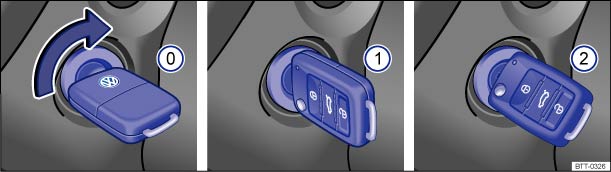
Fig. 127 In the ignition switch: Vehicle key positions.
 Read and follow the introductory information and
safety information first⇒
Read and follow the introductory information and
safety information first⇒ Introduction
to the subject
Introduction
to the subject | Vehicle key ⇒ Fig. 127 | |
|---|---|
| No vehicle key in ignition switch: Steering column lock engaged. | |
| ⓪ | Ignition switched off. The vehicle key can be removed. |
| ① | Ignition is switched on. Steering column lock can be released. |
| ② | Start the engine. When the engine starts, release the vehicle key. When released, the vehicle key returns to position ①. |
If you use the wrong key
If an unauthorized vehicle key has been inserted into the ignition switch, it can be removed as follows:
- Automatic transmission: The vehicle key cannot be removed from the ignition unless both the key and the selector lever have been moved to the correct position. Press the release button on the transmission selector lever, move the selector lever to the Park (P) position and release the button. The vehicle key can now be removed.
- Manual transmission: Pull out the vehicle key.

 Warning
- Always take the key with you when you leave the vehicle. The engine can be started and vehicle systems such as the power windows can be operated, leading to serious personal injury.
- Never leave children, disabled persons, or anyone who cannot help themselves in the vehicle. The doors can be locked with the remote control vehicle key. This could result in people being trapped in the vehicle in an emergency. For example, depending on the time of year, people trapped in the vehicle can be exposed to very high or very low temperatures.
- Heat buildup in the passenger and luggage compartment of a parked vehicle can result in temperatures in the vehicle that are much higher than the outside temperatures, particularly in summer. Temperatures can quickly reach levels that can cause unconsciousness and death, particularly to small children.
- Never remove the key from the ignition switch while the vehicle is moving or rolling to a stop. The steering wheel will lock and you will not be able to steer or control the vehicle.

Leaving the key in the ignition for a long time when the engine is not running will drain the vehicle battery.
Leaving the selector lever for a long period of time in any position other than Park (P) when the ignition is switched off can drain the vehicle battery.
On automatic transmission vehicles, the vehicle key can be removed from the ignition switch only when the transmission is in Park (P). You may have to press the release button on the transmission selector lever to put the lever into Park (P).
Applicable only in the United States
 Warning and indicator lights
Read and follow the introductory information and
safety information first⇒Introduction
to the subject
Lights up
Possible cause
Proper response
B ...
 Starter button
Fig. 128 USA: In the center console:
Starter button of the Keyless Access locking and starting system.
Fig. 129 Emergency starting feature
on vehicles with Keyless Access.
Read and follow the in ...
See More:
Volkswagen Tiguan Owners Manual > Adjusting the seating position: Electrical controls on the driver and front passenger seat
Fig. 40 Driver seat controls to adjust
the seat backward and forward, change seat cushion height and angle, and adjust
backrest angle.
Fig. 41 Lumbar support control.
Read and follow the introductory information and
safety information first⇒Introduction
to the subject The controls on t ...
Volkswagen Tiguan Owners Manual
Volkswagen Tiguan Service and Repair Manual
- Body exterior
- Body Interior
- General Paint Information
- Paint
- Brake System
- Suspension, Wheels, Steering
- Wheel and Tire Guide
- Towing Guide
- Wheel and Tire Guide General Information
- Communication
- Electrical Equipment General Information
- Electrical Equipment from 06/2011
- Heating, Ventilation and Air Conditioning
- Refrigerant R134a Servicing
- 6-Speed Manual Transmission 02Q, OBB, and OFB
