
Volkswagen Tiguan Owners Manual: Using the instrument cluster menus: Premium version
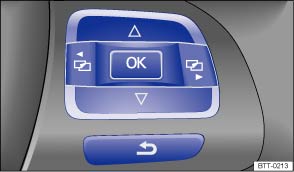
Fig. 16 Premium version (vehicles with menu control multi-function steering wheel): buttons on the right side of the steering wheel.
On vehicles with menu control multi-function steering wheels (Premium version), the instrument cluster menus are controlled with buttons on the right side of the steering wheel ⇒ Fig. 16 .
Accessing the instrument cluster menus
- Switch on the ignition. You will see the vehicle icon or a message in the instrument cluster display.
- Push the OK button (⇒ Fig. 16 ) on the right side of the multi-function steering wheel until a main menu appears in the instrument cluster display. For a list of main menus, see ⇒ Menu structure – overview (Premium version) ⇒ Menu structure – overview (Premium version)
- Push buttons
 or
or
 to move to another main menu,
and push the arrow up and down buttons
to move to another main menu,
and push the arrow up and down buttons
 and
and
 to navigate inside the current
main menu. For example, in the Settings main menu, press the arrow down button
to navigate to the MFI data sub-menu.
to navigate inside the current
main menu. For example, in the Settings main menu, press the arrow down button
to navigate to the MFI data sub-menu.
Displaying sub-items
- Press the OK button ⇒ Fig. 16 to display sub-items located behind the items in a menu. For instance, after scrolling to MFI data in the Settings main menu, press the OK button to display the various MFI data sub-items (Travel time, curr. consum., etc.).
Selecting a setting
- Some menus are used to select settings for certain features. Push the OK button (⇒ Fig. 16 ) to select a setting. For example, the 2 settings under Mirror adjust (Settings > Convenience > Mirror adjust) are Individually and Both mirrors. After navigating to these items, use the arrow up and down buttons to highlight one and then push the OK button to select this setting.
Returning to the higher menu level
- Use the arrow down button
to select Back and then press the OK button (⇒ Fig. 16 ).
 Using the instrument cluster menus: Basic version
Fig. 15 Basic version (Vehicles without
menu control multi-function steering wheel): control buttons Ⓐ and Ⓑ on the windshield
wiper lever.
In the Basic version, the instrument cluster displa ...
 Main menus: Premium version
There are six main menus:
Main menus
Function
See
MFI
Multi-Function Indicator (MFI) information.
⇒
MFI menu (Multi-Function I ...
See More:
Volkswagen Tiguan Service and Repair Manual > Interior Lights, Switches: Rear Door Lamps and Switches
Rear Window Regulator Switch
Rear Window Regulator Switch, Removing and Installing, Rear
The Left Rear Window Switch In Left Rear Door -E52- and Right Rear Window
Switch In Right Rear Door -E54- are installed in the rear door trim panels.
Removing
Switch off the ignition and all electrical consum ...
Volkswagen Tiguan Owners Manual
Volkswagen Tiguan Service and Repair Manual
- Body exterior
- Body Interior
- General Paint Information
- Paint
- Brake System
- Suspension, Wheels, Steering
- Wheel and Tire Guide
- Towing Guide
- Wheel and Tire Guide General Information
- Communication
- Electrical Equipment General Information
- Electrical Equipment from 06/2011
- Heating, Ventilation and Air Conditioning
- Refrigerant R134a Servicing
- 6-Speed Manual Transmission 02Q, OBB, and OFB
