
Volkswagen Tiguan Owners Manual: Parallel parking (Mode 2)
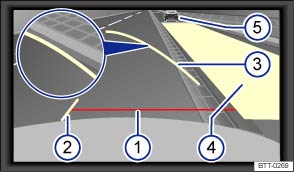
Fig. 142 On screen: Orientation lines and are of the parking space behind the vehicle.
 Read and follow the introductory information and
safety information first⇒
Read and follow the introductory information and
safety information first⇒ Introduction
to the subject
Introduction
to the subject When a turn signal is set, unnecessary lines and areas are hidden.
Orientation lines overview
Meaning of the orientation lines and areas projected on screen ⇒ Fig. 142 . All distances of the orientation lines refer to a vehicle on a level surface.
 Safety distance: Area up to about 16
inches (40 cm) behind the vehicle on the road.
Safety distance: Area up to about 16
inches (40 cm) behind the vehicle on the road. Vehicle's width limits.
Point to change steering angle.
When the yellow line touches the curb or any other parking space boundary, the steering wheel must be turned in the opposite direction (close-up view).
 The parking area parallel to the vehicle
which is needed for parking. The area shown must fit completely into the parking
space.
The parking area parallel to the vehicle
which is needed for parking. The area shown must fit completely into the parking
space. Parked vehicle at the curb.
Parking
- Position the vehicle about 3 feet (1 meter) away from and parallel to the parking space and shift into reverse.
- On the screen of the navigation system, activate Mode 2 for parallel parking.
- Back up slowly and steer the vehicle so that the yellow surface on the screen is flush with the side boundary of the parking space (such as the curb) and stops short of any obstacle ⑤, such as another vehicle.
- Turn the steering wheel as far as it will go into the direction of the parking space and slowly back up.
- Once the yellow line ③ touches the side boundary of the parking space, such as a painted line or a curb (close-up view), turn the steering wheel as far as it will go in the opposite direction.
- Continue backing up until the vehicles is positioned in the parking space parallel to the roadway. If necessary, correct the parking position.

It may take up to 5 seconds for the area detected by the sensors to be displayed on the factory-installed radio or navigation system screen.
 Parking perpendicular to the road (Mode 1)
Fig. 141 On the screen: Orientation
lines for the parking area behind the vehicle.
Read and follow the introductory information and
safety information first⇒Introduction
to the subject Orie ...
 Hill Hold
Hill Hold helps keep the vehicle from rolling backwards when starting out on
a hill, for example after stopping at a traffic light. You don't have to apply and
release the parking brake while depr ...
See More:
Volkswagen Tiguan Owners Manual > Towing: Towing on a commercial tow truck
Read and follow the introductory information and
safety information first⇒Introduction
to the subject To help avoid damaging the vehicle, have it towed only by a professional
towing company. Read and heed the following information:
General information
Never let the vehicle be towed at sp ...
Volkswagen Tiguan Owners Manual
Volkswagen Tiguan Service and Repair Manual
- Body exterior
- Body Interior
- General Paint Information
- Paint
- Brake System
- Suspension, Wheels, Steering
- Wheel and Tire Guide
- Towing Guide
- Wheel and Tire Guide General Information
- Communication
- Electrical Equipment General Information
- Electrical Equipment from 06/2011
- Heating, Ventilation and Air Conditioning
- Refrigerant R134a Servicing
- 6-Speed Manual Transmission 02Q, OBB, and OFB
