
Volkswagen Tiguan Owners Manual: Electronic parking brake
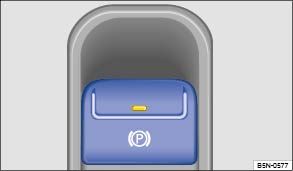
Fig. 135 In the lower center console: Button for the electronic parking brake.
 Read and follow the introductory information and
safety information first⇒
Read and follow the introductory information and
safety information first⇒ Introduction
to the subject
Introduction
to the subject Engaging the electronic parking brake
You can engage the electronic parking brake any time while the vehicle is not moving – even if the ignition is switched off. Always engage the parking brake when you leave or park the vehicle.
- Pull up and hold the button
 until the indicator
light in the button turns on.
until the indicator
light in the button turns on.
- The parking brake is engaged when the indicator lights
in the button and in the instrument cluster ⇒ Warning
and indicator lights comes on.
Releasing the electronic parking brake
- Switch the ignition on.
- Push down the button . Depress the brake pedal
hard at the same time.
- The indicator lights in the button and in the
instrument cluster go out.
Automatic release of the electronic parking brake when starting to move
The electronic parking brake is released automatically when the vehicle first starts to move, provided the driver door is closed and the driver safety belt is fastened. With a manual transmission, you must also press the clutch pedal all the way down before you start driving so the system recognizes that the parking brake should be released.
Emergency braking function
Only activate the emergency brake function in emergencies where the vehicle cannot
be stopped using the foot brake ⇒
!
- Pull up and hold the button to brake the vehicle
hard. An acoustic warning will sound at the same time.
- To stop braking the vehicle, release button
or step on the accelerator.

 Warning
- Never use the parking brake to slow down the vehicle when it is moving, except in an emergency. Braking distance is much longer, since only the rear wheels are braked. Always use the foot brake.
- Never press the accelerator pedal when a selector lever position or gear is engaged and the engine is running. The vehicle could begin moving, even if the electronic parking brake is set.
- ever activate the throttle manually from the engine compartment when the engine is running and the automatic transmission is in gear. The vehicle will start to move even if the parking brake is engaged.

 Note
Note

 Warning and indicator lights
Read and follow the introductory information and
safety information first⇒Introduction
to the subject
Lights up
Possible cause or meaning ⇒
Proper response
...
 Parking
Read and follow the introductory information and
safety information first⇒Introduction
to the subject Please note legal regulations when stopping and parking your vehicle.
Parking the vehicle ...
See More:
Volkswagen Tiguan Service and Repair Manual > Seat Frames: Passenger Seat without Height Adjustment
Tools
Special tools and workshop equipment required
Torque Wrench 1783 - 2-10Nm -VAG1783-
Torque Wrench 1331 5-50Nm -VAG1331-
Engine and Gearbox Bracket VAS6095A -VAS6095A-
Engine/Transmission Holder - Seat Repair Fixture -VAS6136-
Sill-Side Trim Panel, Removing and Installing
Removi ...
Volkswagen Tiguan Owners Manual
Volkswagen Tiguan Service and Repair Manual
- Body exterior
- Body Interior
- General Paint Information
- Paint
- Brake System
- Suspension, Wheels, Steering
- Wheel and Tire Guide
- Towing Guide
- Wheel and Tire Guide General Information
- Communication
- Electrical Equipment General Information
- Electrical Equipment from 06/2011
- Heating, Ventilation and Air Conditioning
- Refrigerant R134a Servicing
- 6-Speed Manual Transmission 02Q, OBB, and OFB
